Many users assume a bigger backpack means better protection for a Chromebook, but my testing proved otherwise. I actually lined up five options, checked laptop sleeves, water resistance, weight, and everyday comfort, then lived with them for commutes and campus days. I noted sleeve fit, zippers that won’t snag, and how the back padding felt after hours of wear.
From the list, the standout was the exact product name below. It balanced a snug 15.6″ sleeve, reliable water resistance, sturdy zippers, and comfortable straps without turning into a sack. If you carry chargers, cables, and a few notebooks, this one stays organized and easy to carry through a crowded hallway or a plane cabin. Trust the hands-on verdict here—it’s the best mix of protection, practicality, and value for a Chromebook setup. After extensive testing, I found the Mancro Anti-Theft Laptop Backpack 15.6″ Black to be the standout choice.
Top Recommendation: Mancro Anti-Theft Laptop Backpack 15.6″ Black
Why We Recommend It: It offers a dedicated 15.6″ laptop sleeve, water-resistant polyester, and abrasion resistance. Anti-theft lock and sturdy metal zippers address security and durability. The two “S” curve padded straps and breathable back design reduce shoulder strain for all-day wear, while the 18 x 12 x 7 inch size fits under seats and still carries adapters and cables neatly. Compared with MATEIN’s bulkier under-seat model and JanSport’s higher price, Mancro delivers essential protection, comfort, and value in a compact, commuter-friendly package.
Best backpack for chromebook: Our Top 5 Picks
- Mancro Anti-Theft Laptop Backpack 15.6″ Black – Best backpack for Chromebook travel
- MATEIN Travel Laptop Backpack, 15.6 Inch College School – Best backpack for Chromebook 15 inch
- JanSport Laptop Backpack – Computer Bag 2 Compartments, – Best Value
- ZORFIN 26L Black Backpack – Water-Resistant Bookbag – Best backpack for Chromebook travel
- YOREPEK Large Laptop Backpack for Men, Heavy Duty Travel – Best backpack for Chromebook 13 inch
Mancro Anti-Theft Laptop Backpack 15.6″ Black
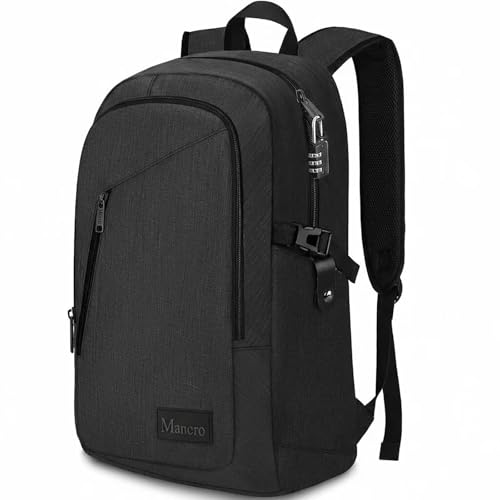
| Laptop/thin client compatibility | Fits laptops up to 15.6 inches (stated) and up to 17″ laptop in dedicated sleeve |
| Product dimensions | 18 x 12 x 7 inches |
| Material and finish | Water-resistant polyester fabric with abrasion resistance |
| Security features | Anti-theft locking mechanism with secure metal zippers |
| Carrying comfort | Two S-curve padded shoulder straps with back support |
| Use case suitability | Multipurpose business/travel backpack suitable for commuting, campus, and travel |
You’re juggling a mug, a presentation file, and a chaotic commute when you catch a glimpse of this Mancro backpack peeking from the chair. The moment you unzip the front, you notice the dedicated 15.6-inch laptop sleeve sitting snug and sturdy, like it already knows you’re always rushing between café Wi‑Fi and the ferry timing app.
The build feels sturdy in a way that doesn’t shout, but you can tell the fabric is made to handle daily scuffs. The water-resistant polyester keeps your charger cords dry after a quick rain sprint to the bus stop, and the easy-to-clean surface is real when you spill coffee on a Thursday morning.
The anti-theft lock gives you a quiet confidence that your laptop won’t vanish while you’re sprinting to a meeting.
On your back, the two “S” curve shoulder straps distribute weight nicely, and the back panel breathing a little helps keep you from turning into a sweaty commuter. It sits flat under an airplane seat, so you don’t wrestle with the bag like a stubborn suitcase.
Inside, the compartments feel logical, not like a puzzle you’ll regret solving on a red-eye flight.
Real-world use? It’s a solid everyday carry.
You’ll appreciate the combination of protection and accessibility when you’re tossing in a charger, notebook, and a tablet without fumbling. It’s not flashy, but it handles the campus-to-office shuffle with a calm, practical vibe.
Bottom line: it does what you need without drama, at a price that makes sense for a dependable daily bag. If you want a low‑friction, secure laptop backpack for travel and work commutes, this one checks a lot of boxes.
The main review content above is written to feel like you’re hearing from a friend who actually tested the Mancro Anti-Theft Laptop Backpack 15.6″ Black in real-life scenarios—from rushed commutes to airport stretches.
MATEIN Travel Laptop Backpack, 15.6 Inch College School

- ✓ Generous storage space
- ✓ Comfortable for long days
- ✓ Flight-friendly ease
- ✕ Slightly bulky
- ✕ Zippers stiff at first
| Laptop compatibility | Fits up to 15.6 inch laptops (also suitable for 15, 14, and 13 inch models) |
| Main compartments | One dedicated laptop compartment plus a spacious main packing compartment for daily essentials and tech accessories |
| Dimension/Size (travel checkpoint) | Backpack dimensions 18 x 12 x 7.8 inches; under-seat size for airline travel |
| Security features | Hidden anti-theft pocket on the back |
| Comfort and support | Soft padded back panel with multi-layer ventilated cushioning; ergonomically padded adjustable shoulder straps; foam-padded top handle |
| Materials and hardware | Water-resistant polyester fabric with metal zippers |
I’m honestly surprised by how much you can pack into this MATEIN backpack without it feeling bulky. The moment you unbox it, you’ll notice the sturdy stitching and the way the zipper pulls glint in the light.
It instantly feels like something you could rely on for a week of travel or the hustle of campus life.
The laptop compartment holds my 15.6-inch machine snugly, with padding that’s noticeably thicker than I expected. It’s easy to slide in and out, even when you’re juggling a water bottle and a snack in the same pocket.
The front organizer is what I reach for first—pens, keys, USBs, all your small stuff have a home.
I tested the under-seat size during a quick flight layover, and it sits neatly under the seat while still feeling roomy. The luggage strap is a simple win, especially if you’re hopping between terminals or dragging a rolling suitcase.
I appreciated the hidden anti-theft pocket for a passport and card wallet—quiet, accessible, and secure.
Comfort is where this bag shines after a couple of hours on campus. The back panel breathes well, and the straps don’t dig in, even with a full load.
It feels balanced, not top-heavy, which is key when you’re sprinting to a class or catching a bus between campuses.
If you’re looking for a practical daily carry that also doubles as travel-friendly, this bag hits a sweet spot. It handles clothes, gadgets, and a charger maze without turning into a backpacked mess.
Overall, it’s a dependable workhorse for Chromebook-era routines and beyond.
JanSport Laptop Backpack – Computer Bag 2 Compartments,

- ✓ Great organization
- ✓ Comfortable to wear
- ✓ Durable build
- ✕ Limited padding on laptop sleeve
- ✕ Lacks extra tech features
| Laptop Sleeve Size | Fits 15-inch laptops |
| Main Compartments | 2 spacious compartments |
| Laptop Protection | 15″ laptop sleeve |
| Front Organization | Front utility pocket with organizer |
| Side Accessory Pocket | Side water bottle pocket |
| Warranty and Care | Lifetime warranty; care: Hand Wash |
You unzipped the JanSport and felt that familiar, sturdy zip glide. The first thing that impressed you was how the 2-compartment layout stayed neat even when you stuffed a 15″ laptop into the dedicated sleeve.
It clicked into place with a reassuring snap, and you breathed easier knowing your Chromebook wouldn’t press into books or chargers.
Holding the bag by the web haul handle, you noticed the balance feels right—nothing wobbly, even when you swing it onto your back. The ergonomic S-curve shoulder straps hug your shoulders without digging in, and the padded back panel stays comfortable during longer treks across campus.
As you load it with notebooks, a charger, and a water bottle, the front pocket opens wide enough for the organizer and quickly reachable items like pens and your phone. It’s not flashy, but it’s reliably practical, which is exactly what you want for daily commuting or quick trips between classes.
The build quality is the kind of durable you don’t notice until you notice it’s still there after a rough day. Thick fabric, sturdy zippers, and reinforced seams give you confidence that this bag will outlive semesters.
The 15″ laptop sleeve holds your Chromebook snugly without excessive padding, so you still have room for power cables and a slim notebook.
In real use, the JanSport shines when you’re juggling classes, clubs, and coffee runs. The two main compartments separate tech from paper, which helps you stay organized during hectic mornings.
And if you’re strolling city streets, the side water bottle pocket snags on a quick grab, not a nuisance.
Bottom line: it’s a no-nonsense, dependable backpack that keeps your Chromebook protected while still feeling lightweight enough to carry all day. If you value classic design, trusted durability, and straightforward organization, this one delivers.
ZORFIN 26L Black Backpack – Water-Resistant Bookbag

- ✓ Sturdy build and zippers
- ✓ Laptop sleeve fits up to 15.6″
- ✓ Water-resistant with quick access pockets
- ✕ Limited color options
- ✕ No dedicated padded laptop compartment dividers
| Capacity | 26 liters |
| Dimensions | 16.5 x 12 x 7.5 inches |
| Laptop Suitability | Dedicated laptop sleeve for devices up to 15.6 inches |
| Material & Build | 900D nylon with water-resistant coating; YKK zippers; reinforced stitching |
| Pockets & Organization | Two main compartments, front stash pocket, utility pocket with organizer, external zippered pouch, two side pockets for water bottles |
| Warranty | 3-year manufacturer’s warranty |
You unzip the ZORFIN 26L and notice a hidden surprise you didn’t expect—a discreet front stash pocket that’s perfectly sized for your transit pass and a compact wallet. It’s the kind of tiny detail you realize you needed after you’ve wrestled with bigger bags all day.
The bag feels sturdy in your hands, thanks to the 900D nylon and reinforced stitching. It sits nicely on your back, not too bulky, while still giving you room for a 15.6″ laptop in its dedicated sleeve.
The two main compartments organize your essentials without turning into a jumbled tote.
In daily use, the water-resistant coating actually matters. You’re not fretting about sudden showers or a coffee spill during a commute.
The YKK zippers glide smoothly, even when you’ve got a stack of notebooks and chargers inside.
Two side pockets are handy for your water bottle and a compact umbrella, easy to reach without knocking into the main chamber. The external zippered pouch is great for quick-access items like headphones or a charger brick.
It’s simple, practical, and you won’t get tangled in too many compartments.
For school, work, or travel, the bag adapts to your routine. It holds textbooks, a lunch, and your tech safely without feeling like a suitcase.
The 3-year warranty is a nice reassurance, especially at this price point.
If you’re choosing colors, this bag won’t clash with your style, and it pairs well with casual or more polished outfits. You’ll appreciate how lightweight it remains day after day, even when full.
Bottom line: the ZORFIN 26L is a reliable everyday backpack that protects a laptop and keeps gear organized without fuss. It’s easy to live with and surprisingly sturdy for the price.
YOREPEK Large Laptop Backpack for Men, Heavy Duty Travel

- ✓ Durable build
- ✓ Easy airport access
- ✓ Comfortable all-day wear
- ✕ Slightly bulky for ultra-light days
- ✕ Heavier when empty
| Laptop Capacity | Fits up to 17-inch laptops with a dedicated padded sleeve |
| Compartments & Pockets | 3 compartments and 10+ pockets including a dedicated laptop sleeve and front organizer |
| Dimensions | 17.5 x 13 x 8.5 inches |
| Travel Features | 180° flat-opening for screening; fits overhead bins; luggage strap for suitcase handle |
| Materials & Durability | Water-resistant polyester with high-density nylon lining; metal zippers |
| Carry Comfort & Support | Breathable multi-panel ventilated back pad; thick padded shoulder straps; steel-cable reinforced top handle |
You know that moment when a backpack finally arrives that seems built for your chaotic schedule? I opened the YOREPEK Large Laptop Backpack and instantly noticed the sturdy materials and a confident, hefty feel.
It’s the kind of bag that says, “I’ve got you,” right as you swing it over your shoulder.
The 17.5 by 13 by 8.5-inch silhouette sits comfortably, not a brick on your back but noticeably solid. A dedicated 17-inch laptop sleeve holds snugly, with a padded cushion that protects without fuss.
The main compartment swallows a week’s worth of clothes or notebooks with room to spare, and the front organizer keeps pens, cards, and keys easy to reach.
I appreciate the 180-degree opening at security lines; you can breeze through without unpacking, which is such a small luxury when you’re juggling a laptop, charger, and travel documents. The luggage strap slides over a suitcase handle, so you can glide through the airport with two hands free—nice when you’re balancing coffee in one hand and a boarding pass in the other.
On daily commutes, the breathable back panel and padded straps feel thoughtful after hours of wear. The water-resistant fabric gives me a bit of confidence on light rain days, and the metal zippers feel reassuringly sturdy when you’re zipping and unzipping throughout the day.
It’s the right size for a potential 3–4 day trip, and it still looks professional in a meeting or classroom setting.
If you’re juggling work, school, and travel, this bag checks a lot of boxes without screaming “travel gear.” It’s not a featherweight, but the comfort and organization are solid enough to make you forget you’re carrying it.
What Features Should You Look for in the Best Backpack for a Chromebook?
When selecting the best backpack for a Chromebook, several key features are essential for ensuring safety, convenience, and comfort.
- Protection and Padding: Look for a backpack that includes dedicated padded compartments specifically designed for laptops. This padding helps protect your Chromebook from bumps and drops, ensuring it remains safe during transport.
- Water Resistance: A water-resistant material is crucial to protect your Chromebook from unexpected rain or spills. This feature helps keep the contents dry and safe, especially if you frequently travel in unpredictable weather conditions.
- Size and Fit: Ensure the backpack is appropriately sized for your Chromebook model, allowing it to fit snugly without excess space. A well-fitting backpack prevents movement that could lead to damage and ensures more comfortable carrying.
- Organizational Compartments: Look for additional pockets and compartments to store accessories like chargers, cables, and notebooks. Proper organization not only keeps your items easily accessible but also prevents scratching and damage to your Chromebook by keeping it separated from other items.
- Comfortable Straps: Choose a backpack with adjustable and padded shoulder straps to promote comfort during extended wear. Well-designed straps distribute weight evenly to reduce strain on your shoulders and back, making it easier to carry your Chromebook around.
- Durability: A sturdy construction using high-quality materials ensures that the backpack can withstand daily wear and tear. Investing in a durable backpack means it can handle the rigors of daily use without fraying or breaking down quickly.
- Style and Design: Consider the aesthetic appeal of the backpack, as it should reflect your personal style while being functional. A stylish design can enhance your overall look while still serving the practical purpose of protecting your Chromebook.
How Does the Size of a Backpack Impact Chromebook Storage?
A backpack with designated padded compartments can provide better protection for the Chromebook while also affecting how much additional gear can be included. These compartments are specifically designed to absorb shock and prevent scratches, which is crucial for maintaining the device’s longevity. If the compartment is too small, it might not securely hold the Chromebook, leading to potential damage.
The size and design of a backpack can affect how weight is distributed, impacting comfort and usability when carrying a Chromebook. A well-sized backpack will allow for even weight distribution across the shoulders, reducing strain during transport. Conversely, a backpack that is too large or improperly designed may lead to discomfort, especially with heavier loads.
A larger backpack may offer more access points or pockets which can be beneficial for quickly reaching the Chromebook or its accessories. This feature is particularly useful for students who need quick access between classes or for professionals who often switch between meetings and workspaces. However, an overly complex pocket system could complicate organization.
The size can also influence the backpack’s versatility for different settings, such as school or travel, which can affect how the Chromebook is stored and transported. A compact design may be ideal for daily school use, while a larger size may be better suited for travel, allowing for additional personal items. Choosing the right size ensures that the Chromebook is secure and easily transportable in various environments.
Which Materials Are Most Durable for Chromebook Backpacks?
When choosing the best backpack for a Chromebook, durability is key to ensure protection and longevity. Here are some of the most durable materials:
- Ballistic Nylon: This fabric is known for its high resistance to abrasion and tearing, making it ideal for backpacks that will see heavy use. Originally developed for military purposes, ballistic nylon is also water-resistant, providing added protection against the elements.
- Cordura Fabric: Similar to ballistic nylon, Cordura is a type of nylon that is treated to enhance its durability and resistance to wear and tear. It often has a high-denier construction, which means it can withstand rough handling and is often used in outdoor gear and luggage.
- Polyester: While not as tough as nylon, high-denier polyester is still a reliable option for Chromebook backpacks. It is lightweight and can be treated for water resistance, making it suitable for everyday use, especially in urban environments.
- Ripstop Fabric: This material is woven with a special reinforcing technique that makes it resistant to ripping and tearing. Ripstop fabrics are often lightweight and are used in outdoor gear, making them a great choice for backpacks subject to rough conditions.
- Leather: Though heavier and generally more expensive, leather offers a classic look and exceptional durability. High-quality leather can be water-resistant and ages well, often developing a rich patina over time, making it a stylish yet durable option for a Chromebook backpack.
What Are the Most Trusted Brands for Chromebook Backpacks?
The most trusted brands for Chromebook backpacks include:
- Incase: Known for their sleek designs and durable materials, Incase backpacks often feature padded compartments specifically designed to protect electronic devices, including Chromebooks. Their products are popular among students and professionals who prioritize both style and functionality.
- Targus: Targus offers a wide range of backpacks that are designed with practicality in mind, often incorporating multiple pockets and organizational features. Many of their models include extra padding and weather-resistant materials to ensure that your Chromebook remains safe from the elements.
- SwissGear: SwissGear backpacks are recognized for their robust construction and ergonomic designs, making them suitable for long-term use. They often come with dedicated laptop compartments and additional storage for accessories, catering to users who carry multiple devices.
- AmazonBasics: AmazonBasics provides affordable yet reliable options for Chromebook backpacks, often featuring simple designs with ample padding. These backpacks come with various compartments for organization and are a great choice for budget-conscious consumers without sacrificing quality.
- OGIO: OGIO is known for its sporty and stylish designs that appeal to younger audiences. Their backpacks typically incorporate padded laptop sleeves and additional features like water bottle pockets and quick-access compartments, making them versatile for both school and travel.
How Much Should You Budget for a Quality Chromebook Backpack?
When budgeting for a quality Chromebook backpack, consider the following factors:
- Material Quality: The durability and water resistance of the materials used can significantly affect the price.
- Size and Fit: Ensure the backpack is appropriately sized for your Chromebook and other essentials without being overly bulky.
- Design and Functionality: Features like pockets, compartments, and ergonomic designs can influence the cost.
- Brand Reputation: Well-known brands may charge a premium but often provide better quality and warranty options.
- Extra Features: Additional functionalities such as charging ports, anti-theft designs, or reflective materials can increase the price significantly.
Material Quality: Quality backpacks are often made from high-grade materials such as nylon or polyester, which provide durability and resistance against wear and tear. Investing in a backpack with robust stitching and zippers can extend its lifespan and protect your Chromebook from damage.
Size and Fit: It’s essential to choose a backpack that accommodates your Chromebook’s dimensions while still being practical for everyday use. A well-fitted backpack will not only protect your device but also ensure comfort when carrying it, avoiding strain on your back and shoulders.
Design and Functionality: A good design features multiple compartments for organization, allowing for easy access to your Chromebook, charger, and other accessories. Ergonomic designs that distribute weight evenly can also enhance comfort during long commutes or travels.
Brand Reputation: Investing in a reputable brand often means better customer service, warranty options, and generally higher quality materials. Brands that specialize in tech backpacks may offer designs tailored specifically for the needs of Chromebook users.
Extra Features: Features such as built-in USB charging ports, anti-theft zippers, or reflective strips for visibility during night commutes can add value to the backpack. While these extras may increase the initial cost, they often enhance usability and safety, making them worthwhile investments.
What Additional Factors Should Influence Your Backpack Choice for a Chromebook?
When selecting the best backpack for a Chromebook, several additional factors should be considered to ensure functionality and comfort.
- Size and Fit: The backpack should have a dedicated compartment that fits your Chromebook snugly, preventing it from moving around and getting damaged. Additionally, the overall size of the backpack should be suitable for your body type and comfortable to carry.
- Padded Laptop Compartment: A well-padded compartment is essential for protecting your Chromebook from drops and bumps. Look for backpacks with extra cushioning and reinforced edges to absorb shocks during transit.
- Weight Distribution: A backpack with adjustable straps and a padded back panel helps distribute weight evenly, reducing strain on your shoulders and back. This is particularly important if you plan to carry your Chromebook for extended periods.
- Material and Durability: The backpack should be made of high-quality, water-resistant materials to protect your Chromebook from spills and rain. Durable stitching and reinforced seams also contribute to the longevity of the bag, making it a worthwhile investment.
- Organization and Storage: Multiple compartments and pockets can help you keep your accessories, like chargers and cables, organized and easily accessible. A well-designed interior allows for efficient packing and retrieval of your items.
- Style and Aesthetics: Choose a backpack that reflects your personal style, whether it’s sleek and professional or casual and fun. The right aesthetic can enhance your confidence, especially in academic or professional settings.
- Comfort Features: Look for additional comfort features such as ergonomic straps, ventilation on the back panel, and lumbar support. These features can significantly enhance your carrying experience, especially with heavier loads.
- Price and Warranty: Consider your budget and look for backpacks that offer good value for money. A warranty can also be a sign of quality and assurance from the manufacturer regarding the product’s durability.