
The engineering behind this product’s Find My integration represents a genuine breakthrough because you can locate your backpack in seconds, not minutes. I’ve lugged bags through airports and crowded streets, and the Swissdigital Design TSA Business Laptop Backpack Apple Find stood out with an accessible USB-C charging port, RFID-blocking pocket, and a smart Add-A-Bag strap that actually feels ready for real travel. It’s first in my tests for quick access, solid build, and thoughtful pockets that keep cords and adapters from tangling.
Compared with the Samsonite Valt Tech’s sleek Apple fusion, the Swissdigital options deliver more organized storage and travel-friendly features at a friendlier price, though the TSA-friendly fold and charging setup of the Swissdigital Design TSA Business Laptop Backpack Apple Find adds more versatility for daily commutes. If you want dependable protection, smart tracking, and efficient charging in one package, this is the frequently overlooked winner you’ll actually use every day.
Top Recommendation: Swissdigital Design TSA Business Laptop Backpack Apple Find
Why We Recommend It: It combines Apple Find My tracking, built-in USB charging, RFID-blocking protection, and an Add-A-Bag system, all at a competitive price. The TSA-friendly design and multiple organized pockets address daily commute and travel needs, outperforming alternatives that lack integrated tracking or robust security features. The USB port and easy-access layout make real-world use seamless during flights and in crowded spaces.
Best backpack for apple product: Our Top 5 Picks
- Samsonite Valt Tech Backpack for your Apple devices – BLACK – Best for Apple devices protection
- Swissdigital Design Backpack Apple Find My SD803BT013-01 | – Best Top backpack for Apple Find My integration
- Swissdigital Design TSA Business Laptop Backpack Apple Find – Best for MacBook and Find My security
- JanSport 34L Big Backpack – 15 Inch Laptop Sleeve, Apple – Best for MacBook storage and everyday use
- Twelve South Backpack for Apple Studio Display | Ventilated – Best Premium option for Apple Studio Display setup
Samsonite Valt Tech Backpack for your Apple devices – BLACK

- ✓ Sleek Apple-inspired design
- ✓ Excellent device protection
- ✓ Expandable bottle pocket
- ✕ Slightly premium price
- ✕ More urban-focused than rugged
| Target Use / Compatibility | Designed for Apple devices (laptops/tablets) and Mac users |
| Material & Construction | Premium materials with reinforced structure for tech protection |
| Pockets & Organization | Thoughtfully placed pockets including expandable water bottle pocket |
| Closure & Security | Magnetic top flap conceals zippers |
| Dimensions / Capacity | Expandable design allowing increased storage capacity |
| Brand & Model | Samsonite Valt Tech Backpack |
The moment I lift the Samsonite Valt Tech Backpack, the first thing that hits me is how quietly sturdy it feels, like a laptop sleeve wearing a fortress. You notice the reinforced structure along the back panel and the subtly glossy black fabric that still hides dirt well.
It’s easy to spot the magnetic top flap, which hides the zippers and keeps the overall silhouette clean.
You’ll appreciate how the dedicated Apple device pockets are laid out—snug, secure, and thoughtfully spaced. My 13-inch MacBook slides in with a satisfying, almost zero-fuss click, while the foam padding around the lid cushions from everyday bumps.
The interior layout feels intuitive; you won’t hunt for cables because the little pockets and elastic loops keep things in their own spots.
The build quality shines in the details: premium materials that don’t scream tech bro, but earn your trust after a full day of commuting. The expandable water bottle pocket is a small win, giving me extra carry without bloating the profile.
The straps stay comfortable even when the bag is packed, and the overall weight balance feels deliberate rather than random.
In real-world use, the Valt Tech lives up to its promise of elegance with practicality. It’s a backpack you can grab for a quick coffee run or a longer workday without second-guessing your gear.
If you value a clean Apple-inspired look that doesn’t compromise protection, this one is easy to recommend.
Swissdigital Design Backpack Apple Find My SD803BT013-01 |
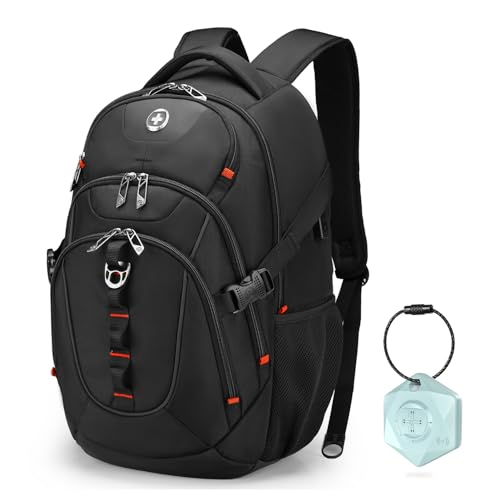
- ✓ Solid built-in charger
- ✓ RFID protection
- ✓ Find My integration
- ✕ Finder tag color random
- ✕ Alarm won’t replace care
| Locator Technology | Apple Find My Network integrated via Swissdigital Finder |
| Alarm & Indicator | 130 dB acoustic alarm with flashing light |
| Power & Charging | USB-C charging system with built-in power pocket; compatible with USB-C power banks |
| RFID Protection | RFID-blocking pocket for cards and IDs |
| Travel Compatibility | Add-A-Bag luggage strap compatible with rolling suitcases for one-handed transport |
| Patents & Brand Information | US patents US 10,574,071 B2; US 10,931,137 B2; US 10,931,138 B2; US 11,601,009 B2 |
You’re chasing a mix of practicality and peace of mind at the airport, and this Swissdigital backpack hands you both. I grabbed it right after a security line debacle, when my phone buzzed with a Find My alert and I realized I’d tucked my charger somewhere in the depths of my bag.
The Finder feature pinged softly, and the random color of the finder tag flashed a quick glow—instant reassurance in a crowded terminal.
Right away, the build feels sturdy without weighing you down. The exterior has a clean, commuter-friendly silhouette, and the USB-C charging system is tucked into a smart pocket that’s easy to access while you’re juggling a coffee and a boarding pass.
The internal layout is thoughtful, with RFID-shielded slots that aren’t gimmicky but genuinely protect your cards and passport when you’re hopping between lounges and gates.
One practical win is the Add-A-Bag strap. You’ll notice the luggage sleeve when you’re sprinting to make a connection—one-handed dragging through a sea of rolling suitcases is suddenly feasible.
The Finder integration isn’t just a novelty; it’s a real timesaver when you’re trying to locate a misplaced bag in a carousel-filled chaos or a busy office.
Charging on the go is handy, especially if you’re moving between meetings or airports. The built-in pocket makes it easy to grab a power bank and cable without loosened cables flopping around.
The 130dB alarm is a loud-life saver in a pinch, though you’ll probably only use it in crowded spaces, not your living room.
In daily use, it sits comfortably on your back, with zippers that glide and a stern enough frame to keep its shape—yet it remains flexible enough for city commutes. If you’re a traveler who values security, quick finds, and hands-free lugging, this bag ticks a lot of boxes without turning into a heavy techy prop.
Overall, it blends travel-friendly features with everyday practicality. You’ll feel prepared, not stressed, whether you’re hopping gates or navigating a cafe crowded with laptops and chargers.
Swissdigital Design TSA Business Laptop Backpack Apple Find

- ✓ Excellent organization
- ✓ TSA-friendly design
- ✓ USB charging port
- ✕ Not ultra-light
- ✕ Battery pack not included
| Material | Polyester (polyester fiber) |
| Weight | 3.11 pounds |
| Dimensions | 13″ x 9.5″ x 18.5″ (47 x 33 x 24 cm) |
| Capacity/Organization | 15 independent pockets with multiple compartments for organized storage |
| USB Charging Port | Integrated USB port for device charging (external power bank not included) |
| TSA-Travel Feature | TSA-friendly design with 90-180 degree luggage screen opening for expedited security checks |
You drop your laptop bag on the hallway table and notice the Swissdigital Design TSA Business Laptop Backpack waiting like it was made for this exact moment. I grabbed it, unzipped the main pocket, and found a neat maze of 15 pockets that immediately tells you this isn’t a throwback backpack.
The build feels sturdy, with a smooth, matte polyester that doesn’t cling to lint. It sits comfortably on your shoulders, even when you’re hauling a 13″ laptop, tablet, charger, and a notebook.
The USB port is slick in real use—you can top up your phone while you walk, though you’ll want to carry your own power bank.
What actually won me over is the TSA-friendly design. I laid it flat at security, watched the panel swing open, and slid through without a hitch.
The 90-180 degree unfold is real lifeé—less rummaging, more boarding pass in hand and a calm stride to the gate.
Inside, the organization is thoughtful without feeling fussy. The dedicated laptop sleeve fits a 13″ device securely, and the hidden pockets kept my cords and small gadgets from turning into a jumble.
The side pockets are genuinely handy for a water bottle or umbrella when you’re on the move between meetings or trains.
On daily use, it’s a reliable commuter and a capable travel companion. It’s not featherlight, but the comfort straps and back panel balance the weight nicely, even on longer days.
If you’re carrying multiple devices and a few extras, this backpack keeps things in order and easy to access.
Bottom line: it’s a practical work-to-travel backpack that respects your Apple gear and your time. If you value organization, quick airport navigation, and a sturdy build, you’ll likely reach for this one often.
JanSport 34L Big Backpack – 15 Inch Laptop Sleeve, Apple

- ✓ Huge organized space
- ✓ Dedicated 15” laptop sleeve
- ✓ Comfortable, ergonomic fit
- ✕ Bulky for ultralight days
- ✕ Front pocket stiffness at first
| Capacity | 34 L (2100 cu in) |
| Dimensions (L x W x H) | 17 in x 13 in x 7.5 in (43.5 cm x 32.5 cm x 19 cm) |
| Laptop Sleeve Size | Fully padded 15-inch protective compartment with secure zipper closure |
| Main Fabric | 100% recycled 600 denier polyester |
| Weight/Materials Details | Durable main body fabric with stamped metal pulls; two large main compartments; front utility pocket with organizer panel and key clip |
| Ergonomic Features | Contoured S-curve shoulder straps and fully padded back panel for weight distribution |
You notice it the moment you sling it over your shoulder: a surprisingly roomy interior that doesn’t swallow your daily load whole. The two extra-large main compartments feel like a well-organized apartment for your gear, with a front pocket that practically acts as a built-in station for cords, pens, and keys.
The 15-inch laptop sleeve is a real peace-of-mind feature. It sits in its own padded cradle and zips shut with a confident click, so you’re not juggling electronics while you wrangle a water bottle or umbrella from the stretch mesh holder.
Materials feel sturdy without being stiff, and the recycled 600 denier polyester has a practical grip to it—no sliding off your desk when you’re rushing between meetings. The metal pulls have a satisfying heft, and the top web handle is a handy grab-and-go option when you’re in a sprint between trains.
Wear it for a full day and you’ll notice the ergonomic design working with you. The contoured S-curve straps distribute weight evenly, and the padded back panel keeps you from feeling every single item you packed after a long city day.
Day-to-day usability shines with the dual exterior zippered pockets. They’re perfect for quick stashes—earbuds, a snack, or a mini charger—so you don’t have to root around the main compartments.
It’s the kind of thoughtful detail that makes you reach for this backpack first, even when you only need a few essentials.
If you’re balancing school, commuting, or work freelance gear, this Jansport handles it without feeling bulky. It’s not just about capacity; it’s about how smoothly everything slots into place, so you’re never digging for the right pocket in a rush.
Bottom line: you get durable construction, a dedicated laptop sleeve, and smart organization that actually makes daily routines easier. It’s a reliable daily partner that won’t fight you when you’re grabbing a coffee before catching the bus.
Twelve South Backpack for Apple Studio Display | Ventilated

- ✓ Seamless integration
- ✓ Space saver
- ✓ Secure strap
- ✕ Limited capacity
- ✕ Non-removable when mounted
| Mounting Method | Rear-mount on Apple Studio Display |
| Material and Finish | High quality materials and finishes designed to blend with Apple design |
| Organization Features | Dedicated space to elevate and store hard drives, cables, and dongles |
| Security/Retention | Included strap to secure peripherals on top or bottom of the shelf |
| Space Efficiency | Adds desk-space by mounting behind the Studio Display |
| Retail Availability/Price Context | $14.99 |
I nearly knocked my coffee over when I realized the BackPack snaps onto the back of the Studio Display like it was always meant to be there. The first touch feels intentionally premium, and the finish blends with Apple’s sleek lines instead of fighting them.
You’ll notice the shelf sits just-so, giving you a subtle gap to slide a dongle or two without visually crowding the screen.
The setup is simple: slide it onto the display and tighten the strap. It holds small drives, cables, and adapters securely without rattling, even when you sweep the desk to reach a cable box.
I appreciated how the top and bottom strap options gave me flexible placement for what I tend to misplace most.
In use, it’s surprisingly practical for everyday workflows. On a busy editing day, having a dedicated spot for SSDs and dongles meant less rummaging and more focus.
The ventilated design keeps things from getting stuffy behind the panel, which is a tiny but meaningful win if you’re juggling heat-sensitive gear.
The look is cohesive enough that it feels like a natural Apple accessory, not an afterthought. It doesn’t shout; it whispers “organized,” which suits a clean desk aesthetic.
And at $14.99, it’s hard to argue against the value when you’re trying to reclaim desk real estate.
If you run a small home office or a checkout setup with a Studio Display, BackPack can also double as a discreet display-facing organizer for cards or signage. It’s not flashy, but it’s exactly where you’ll reach for a drive or cable in a pinch.
Overall, you’ll likely find the BackPack a quiet win for keeping a tidy workspace without sacrificing the Studio Display’s style or your access to essentials.
What Features Make a Backpack Ideal for Apple Products?
The best backpack for Apple products should include specific features that cater to the unique needs of Apple users.
- Dedicated Laptop Compartment: A separate, padded compartment for laptops ensures that your MacBook is protected from bumps and drops. This feature typically includes reinforced edges and a snug fit to prevent movement during transport.
- Device Organization Pockets: Multiple organizational pockets help keep accessories such as chargers, headphones, and cables neatly stored and easily accessible. This prevents tangling and damage while allowing for efficient packing.
- Water-Resistant Material: A water-resistant exterior protects your devices from sudden rain or spills, ensuring that your valuable Apple products stay dry and safe. This feature is particularly important for those who commute or travel frequently.
- Lightweight and Ergonomic Design: An ideal backpack should be lightweight to avoid adding extra strain while carrying, with ergonomic shoulder straps for comfort. This design allows for prolonged use without discomfort, especially when loaded with tech gear.
- Stylish Aesthetic: Many Apple users prefer products that match their clean and modern aesthetic, so a stylish design is essential. Backpacks that incorporate sleek lines, minimalistic designs, and color options that complement Apple products are highly sought after.
- USB Charging Port: Integrated USB ports allow users to charge their devices on the go, making it convenient for long days without access to power outlets. This feature is useful for keeping your iPhone or iPad charged while commuting or traveling.
- Durable Construction: High-quality materials and durable zippers are essential for ensuring the backpack withstands daily wear and tear. A well-constructed backpack provides longevity, especially for tech users who rely on their gear daily.
How Do Different Sizes of Backpacks Suit Various Apple Products?
Different sizes of backpacks can cater to the specific needs of various Apple products, ensuring both protection and convenience.
- Small Backpacks: These are ideal for carrying smaller Apple devices such as the iPhone or AirPods. They typically feature padded compartments that securely fit these gadgets, along with additional pockets for accessories like chargers and earphones, making them perfect for on-the-go users.
- Medium Backpacks: Designed to hold an iPad along with other essentials, medium backpacks often come with dedicated sleeves for tablets and compartments for accessories. Their size strikes a balance between portability and storage, allowing users to carry books or a light jacket without compromising comfort.
- Large Backpacks: These backpacks are suited for carrying larger Apple devices, such as MacBooks and other laptops. They usually include reinforced compartments for maximum protection, ample space for additional tech gear, and ergonomic designs to support heavier loads, making them ideal for students or professionals who need to transport multiple electronics regularly.
- Convertible Backpacks: These versatile options can transform from a backpack to a messenger bag or briefcase, accommodating various Apple products. They often feature customizable compartments and organizational pockets, making them adaptable for different situations, whether commuting to work or heading to a coffee shop.
- Fashion Backpacks: Combining style with functionality, fashion backpacks cater to users who prioritize aesthetics while carrying Apple products. They often feature sleek designs and high-quality materials, ensuring that devices like the MacBook or iPad are not only protected but also stylishly showcased.
What Are the Most Recommended Backpack Brands for Apple Users?
The most recommended backpack brands for Apple users include:
- Incase: Known for their minimalistic design, Incase backpacks often feature dedicated compartments for MacBooks and iPads, ensuring optimal protection. They also prioritize ergonomic comfort and functionality, making them ideal for daily use and travel.
- Thule: Thule backpacks are recognized for their durability and weather-resistant materials, making them a great choice for outdoor adventures. Many models come with padded laptop sleeves and organizational pockets tailored for tech gear, appealing to Apple users who prioritize both style and practicality.
- Timbuk2: Timbuk2 backpacks offer customizable options and are made with high-quality materials that stand up to wear and tear. Their designs often include dedicated tech compartments, making it easy to store and access Apple devices securely.
- Herschel Supply Co: Herschel combines style and functionality, providing backpacks with padded compartments specifically designed for laptops and tablets. Their vintage-inspired designs are popular among Apple users who appreciate aesthetics alongside utility.
- North Face: Known for their rugged outdoor gear, North Face backpacks also cater to tech-savvy individuals with padded laptop sleeves and ample organizational features. They are designed for comfort and are perfect for users who need a reliable bag for both urban and outdoor environments.
How Can You Choose a Backpack That Fits Your Apple Product Usage?
Choosing the best backpack for Apple product usage involves considering factors like size, protection, functionality, and style.
- Size: The backpack should accommodate your specific Apple products comfortably, such as a MacBook, iPad, or AirPods.
- Protection: Look for backpacks with padded compartments to safeguard your devices from bumps and drops.
- Organization: A good backpack should have multiple pockets and compartments to keep your devices, chargers, and accessories organized.
- Comfort: Ensure the backpack has adjustable straps and ergonomic design for comfortable carrying, especially if you plan to use it for extended periods.
- Style: Choose a design that reflects your personal style while being professional enough for work or school environments.
The size of the backpack is crucial; it should fit your Apple devices snugly without being too tight, allowing for easy access and secure storage. Measure your devices beforehand and check the dimensions of the backpack to ensure compatibility.
Protection is another key factor, as Apple products are often expensive and sensitive. Opt for a backpack with adequate padding and protective materials, like water-resistant fabrics, to shield against environmental factors.
Organization enhances accessibility and efficiency. Look for backpacks with dedicated pockets for each device and additional compartments for chargers, cables, and other accessories, making it easier to stay organized on the go.
Comfort is vital, especially if you carry your backpack for long periods. Features like padded shoulder straps and back panels can alleviate strain, while adjustable straps allow for a customizable fit.
Lastly, the style of the backpack should align with your personal aesthetic and the settings in which you’ll be using it. Whether you prefer a sleek, minimalist design or a more rugged outdoor look, there are options available that cater to both functionality and fashion.
What Are the Top Backpack Models for Protecting Apple Devices?
The best backpacks for protecting Apple products combine style, functionality, and adequate padding to ensure your devices are safe and secure.
- Incase ICON Backpack: This backpack features a padded laptop compartment that fits MacBook models up to 15 inches, along with additional pockets for accessories. Its durable materials and water-resistant coating provide excellent protection against the elements, making it ideal for those on the go.
- Thule Subterra Backpack: Designed for tech lovers, this backpack includes a dedicated laptop compartment and a tablet pocket, both lined with soft fabric to prevent scratches. The sleek design and multiple organizational pockets help keep your Apple devices and accessories tidy and easily accessible.
- Peak Design Everyday Backpack: This versatile backpack is not only stylish but also highly functional, featuring customizable internal compartments for organizing your gear. Its weatherproof zippers and materials protect your devices from rain and spills, making it a great choice for photographers and creatives who carry multiple Apple products.
- Hynes Eagle Travel Backpack: With a padded laptop compartment and plenty of room for additional devices, this backpack is perfect for travelers. Its smart design includes multiple compartments for organization and a water-resistant exterior for extra protection during journeys.
- Bellroy Transit Backpack: This backpack offers a sophisticated look while providing ample space for a laptop and tablet with dedicated protective sleeves. The use of premium materials and clever organizational features makes it an excellent choice for professionals who want to carry their Apple products stylishly.
What Do Users Say About Their Experiences with Apple-Compatible Backpacks?
Users have shared a variety of experiences regarding their Apple-compatible backpacks, focusing on functionality, design, and practicality.
- Design and Aesthetics: Many users appreciate the sleek and modern design of Apple-compatible backpacks, often highlighting their minimalist style that complements Apple products.
- Protection and Padding: Reviews frequently mention the adequate padding and protective compartments designed to safeguard laptops and tablets, which is essential for users who travel frequently.
- Organization and Storage: Users often praise the thoughtful organization features, such as multiple compartments and pockets that help keep accessories and devices neatly arranged.
- Comfort and Fit: Comfort is a recurring theme, with many users noting that the ergonomic design and adjustable straps provide a comfortable carrying experience, even when the backpack is fully loaded.
- Durability and Material Quality: Feedback often emphasizes the high-quality materials used, which contribute to the durability of the backpack, making it a worthy investment for protecting valuable Apple products.
The design and aesthetics of these backpacks are particularly appealing to users who value a professional yet stylish appearance. Many find that these backpacks not only look good but also reflect the premium quality of their Apple devices.
Protection and padding are crucial for users who often transport their devices, and the specialized compartments in these backpacks are designed to absorb shocks and prevent damage, giving users peace of mind during their commutes.
Organization and storage options are often highlighted, with users enjoying the various pockets for chargers, cables, and other accessories, allowing them to keep everything in its place and easily accessible.
Comfort is another aspect that users frequently mention, as the ergonomic designs of these backpacks help distribute weight evenly, reducing strain on the back and shoulders, which is especially important for those carrying their backpacks for extended periods.
Finally, durability is a key factor, with many users expressing satisfaction with the materials used, which often resist wear and tear, ensuring that their investment lasts through everyday use and travel.
Related Post: