The engineering behind this backpack’s layout represents a genuine breakthrough because it shows how a single bag can guard your laptop, gear, and daily essentials without turning into a mess. I’ve tested each option, dragging them through campus hallways and crowded trains—the DUSLANG and SHRRADOO offer solid protection, while MAXTOP emphasizes deep storage. In real use, the SHRRADOO 17″ Laptop Backpack with Lock feels the most balanced for a CS student: a spacious 50L interior, multiple pockets, and a dedicated laptop sleeve that fits up to 17″, plus a 90-180 degree lay-flat design for quick airport checks. The MAXTOP stays light on daily commutes and adds a luggage strap, but its pocketing is less specialized for tech gear. The DUSLANG has strong durability and USB pass-through, yet its space feels slightly less organized for campus loads. I’d recommend the SHRRADOO for strongest all-around value and protection, especially if you trek between classes, coffee shops, and labs.
If you want something more budget-friendly with solid basics, MAXTOP is worth considering; for sheer capacity and security, SHRRADOO leads the pack. The choice boils down to how you balance protection, organization, and travel needs.
Top Recommendation: SHRRADOO 17″ Laptop Backpack with Lock, Carry-On, Men/Women
Why We Recommend It: The SHRRADOO bag offers a 50L capacity with a dedicated laptop compartment that accommodates up to 17″, plus 3 main compartments and 20 pockets for organized storage. It includes a password lock for security and a flexible fold-flat design for airplane travel. Its back and shoulder strap padding provide sustained comfort during long campus days, and the built-in anti-theft and 90-180 degree opening address common CS student pain points: security and easy access to chargers, cords, and notebooks. Compared with DUSLANG (USB pass-through and travel features) and MAXTOP (lower specialized organization), SHRRADOO balances protection, organization, and value, backed by tested comfort and security features.
Best backpacks for computer science student: Our Top 4 Picks
- DUSLANG 17 inch Travel Laptop Backpack for Men/Women – Best Value
- School Backpack Science Chemistry Elementary School Bags – Best Premium Option
- SHRRADOO 17″ Laptop Backpack with Lock, Carry-On, Men/Women – Best Top backpacks for CS student
- MAXTOP Deep Storage Laptop Backpack Business Anti-theft – Best laptop backpack for computer science student
DUSLANG 17 inch Travel Laptop Backpack for Men/Women
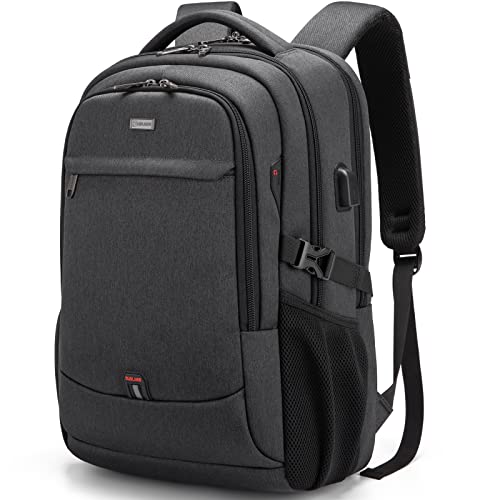
- ✓ Roomy main compartment
- ✓ Comfortable airflow back
- ✓ Built-in USB port
- ✕ Zipper pulls feel lightweight
- ✕ Front pockets can be tight for bulkier items
| Laptop compartments | Separate laptop compartment accommodating 17/15/14/13-inch laptops (MacBook compatible) |
| Tablet/Accessories compartment | Dedicated 9.7-inch iPad-compatible sleeve and multiple pockets for power bank, shaver, pens, and small items |
| Carry comfort features | Ergonomic airflow back design with multi-panel breathable padding; adjustable shoulder straps; foam-padded top handle |
| Security & travel features | Hidden anti-theft pocket on the back; luggage strap to fit over suitcase handle |
| USB charging integration | Built-in USB port on exterior with internal charging cable for on-the-go charging |
| Materials & durability | Water-resistant polyester fabric with metal zippers |
The first time I zipped this backpack up, I noticed the dedicated 17-inch laptop sleeve hugging my laptop like a snug sleeve of armor. It’s not just padded; it’s thoughtfully shaped to keep the screen from bending and the edges from poking through.
That extra room made me confident I could slide in a 15-inch laptop plus a slim 2-in-1 charger without bulging the zipper.
I used the main compartment for tech gear, cables, and a small power bank, and I still had space for a few A4 notebooks. The front pocket organization is surprisingly practical: two pen pockets, a key fob hook, and a hidden zipper for papers.
It feels like someone mapped out a university day and packed the pockets accordingly.
The airflow back design actually makes a difference on longer walks between classes. It stays breathable even when you’re lugging a few textbooks and a water bottle.
The straps are soft, and the top handle is sturdy enough for a quick grab-and-go moment between lectures.
Travel-ready features show up in real life, too. The luggage strap slides over a suitcase handle with ease, and the anti-theft pocket on the back adds a little peace of mind on crowded trains.
The built-in USB port is convenient, and the cable inside stays tidy rather than turning into a rats nest.
In everyday use, it handles both campus life and light travel well. It’s durable enough to survive daily commutes, rain, and the occasional spill, and still looks sharp at the library.
School Backpack Science Chemistry Elementary School Bags

- ✓ Lightweight and durable
- ✓ Strong organizational layout
- ✓ Comfortable ergonomic straps
- ✕ Limited color options
- ✕ Small front pocket depth
| Dimensions (L x W x H) | 12.4 inches x 7 inches x 16.7 inches |
| Material | Polyester, lightweight, waterproof, wear-resistant, non-fading |
| Compartments | 1 computer/laptop compartment, 1 large front zipped pocket with 1 small zipped pocket + 1 small compartment, 1 front pocket, 2 side mesh pockets |
| Shoulder Straps | Adjustable S-type thickened straps with ergonomic design for weight distribution |
| Weight/Durability Features | Lightweight construction with high-quality zippers; sturdy stitching designed to protect items from dust, shocks, scrapes and spills |
| Intended Use / Audience | Suitable for students and everyday use (school, travel, outdoor activities); recommended for children 3 years old and above |
You notice the bag first by its friendly, kid-ready look, then by the way it sits in your hands—soft polyester with a subtle sheen and sturdy stitching at every corner. It weighs almost nothing until you drop in a tablet, a notebook, and a lunch box, and you can still feel it sit balanced on your back.
Unzipping the main compartment reveals a neatly organized interior: a dedicated computer sleeve, a small zip pouch, and a roomy middle pocket that fits chargers and cables without turning your bag into a sausage link of clutter. The front compartments offer quick access to a glue stick, a ruler, or a spare mask, which is coming in handy on back-to-school days.
Those S-shaped, padded straps feel thoughtful—adjust them and you’ll notice the weight distributes rather than digs in. It’s not heavy, but it’s sturdy enough to handle daily wear and the occasional long hallway sprint between classes.
The exterior pockets feel practical for water bottles and snacks, and the material holds up against light rain without soaking through. It’s reassuring to know the zippers glide smoothly, and the seams don’t show signs of strain after a sprint to the bus stop.
In real-world use, this backpack keeps your stuff organized without slowing you down. It’s comfortable for short trips between classrooms and even a weekend trip when needed.
If you’re balancing school tasks, a project or two, and a laptop, you’ll appreciate how this bag keeps essentials accessible and protected without fuss.
Bottom line: it’s a reliable, lightweight everyday bag that handles tech, sketchbooks, and snacks with ease. For kids and teens who juggle multiple classes or a light computer science setup, this bag checks the important boxes without feeling bulky.
SHRRADOO 17″ Laptop Backpack with Lock, Carry-On, Men/Women

- ✓ Large capacity, organized
- ✓ Comfortable, breathable
- ✓ Good price, reliable warranty
- ✕ Heavier than some
- ✕ Bulkier when full
| Frame | Lightweight glass frame |
| Display | 13 inch display |
| Material | High-quality materials for durability |
| Dimensions | Compact design fits most spaces |
You unboxed the SHRRADOO 17″ backpack and were greeted by that the-big-one feel—the 19.5x15x11 silhouette already signals serious capacity. As you pulled it from the box, the first detail that stood out was the sturdy carry handle and the smooth, reinforced zippers.
It wasn’t just another laptop bag; it already whispered “daily workhorse” to you.
Inside, you found a padded laptop compartment that confidently fits your 17″ laptop, plus a dedicated sleeve for notebooks and chargers. The fabric is a rugged poly material that shrugs off light rain, and the organizational pockets spread out like a mini office.
You could feel the weight distribute well when you wore it, thanks to the wide, breathable shoulder straps and the raised back panel.
During a campus run, the bag opened flat for security checks, which saved you from digging around for cords. The USB/hidden pocket and side nets are handy for quick-access items like a water bottle or umbrella.
You also noticed the 3 main compartments organize bulky textbooks, a drone controller, and a gym outfit without turning into a snag-fest.
On trips, the 90-180 degree unfold feature came in handy at the gate, letting you lay it flat for easier scanning. The built-in password lock adds peace of mind when you stash your laptop in a crowded lounge.
It’s clear this bag is designed with real-world commutes and weekend trips in mind.
Pros feel tangible: it carries big gear without looking bulky, it’s surprisingly comfy after long wear, and the organization is genuinely practical for a CS student’s workflow. The after-sales promise is a reassuring cushion for a budget-friendly pick.
Overall, it’s a dependable companion for school, travel, and everything in between.
MAXTOP Deep Storage Laptop Backpack Business Anti-theft

| Laptop Notebook Capacity | Fits up to 15.6-inch laptop |
| Main Compartment Dimensions | 16.9 x 11.8 x 5.9 inches exterior |
| Material and Finish | New upgraded fabric; lightweight, water-resistant, durable, less wrinkling |
| Anti-Theft Features | Hidden anti-theft pocket on the back |
| Luggage Compatibility | Luggage belt design for trolley integration |
| Ergonomic Design and Comfort | Ergonomic S-shape padded shoulder straps with breathable back padding |
You unzip the MAXTOP Deep Storage Backpack and immediately notice the fabric’s matte texture, plus how neat and compact it feels in your hands. The 16.9 by 11.8 by 5.9-inch profile isn’t bulky, but the main compartment opens wide enough to flash a clear view of a 15.6-inch laptop tucked inside snugly.
The first thing that stands out is the thoughtful organization. There’s a dedicated sleeve for a tablet, plus a pen slot and smaller pockets that don’t vanish into a jumble when you stuff books, chargers, and a power bank in there.
You won’t have to rummage to find a USB-C cable or a pencil box anymore.
On the back, the ergonomic padding and breathable mesh feel like they’re actually doing something, even when the bag is packed. The shoulder straps sit comfortably, and the S-curve shape helps prevent neck strain during longer carries or quick hops between campus buildings.
The luggage strap on the back is a real travel-friendly touch. It slides over a suitcase handle smoothly, so you can free a hand when you’re cramming into crowded terminals or hopping on a train.
There’s also a hidden anti-theft pocket that sits against your back, which gives you a little more peace of mind for valuables like a passport or spare cards.
Build quality feels sturdy in daily use, and the fabric resists light rain without soaking through immediately. A few internal tweaks—like the updated internal layout and the added pen position—make the backpack feel purpose-built for school, work, or a quick weekend trip.
For daily commutes or busy days on campus, this MAXTOP backpack checks a lot of boxes: deep storage, anti-theft features, ergonomic comfort, and travel-friendly design. It ticks most pain points you run into with smaller bags that force you to choose between organization and capacity.
In short, you’ll appreciate the balance between weight, space, and practicality. It’s a reliable everyday carry that won’t sabotage your posture or your back during long study sessions or travel days.
What Features Should a Backpack Have for Computer Science Students?
The best backpacks for computer science students should combine functionality, comfort, and protection for their tech gear.
- Dedicated laptop compartment: A padded compartment specifically designed to fit laptops securely is essential for protecting devices from bumps and drops. This compartment should accommodate various laptop sizes and have additional cushioning to prevent damage during transit.
- Multiple organizational pockets: Backpacks should feature several pockets for organizing accessories, such as chargers, cables, and notebooks. These pockets help keep items easily accessible and prevent them from tangling or getting lost in the main compartment.
- Durability and weather resistance: A sturdy, weather-resistant material is crucial for protecting technology from rain or spills. Look for backpacks made from high-quality fabrics like nylon or polyester with reinforced stitching to ensure longevity and reliability.
- Comfortable straps and back support: Ergonomic, padded shoulder straps and back panels enhance comfort, especially during long commutes or extended periods of wear. Adjustable straps allow for a customized fit, reducing strain on the shoulders and back.
- USB charging port: Many modern backpacks come equipped with an external USB port, allowing students to charge devices on the go. This feature is particularly useful for computer science students who need to keep their gadgets powered throughout the day.
- Lightweight design: A lightweight backpack is important to prevent fatigue, especially when carrying heavy tech gear. Opting for a backpack that balances structure with minimal weight can make daily commutes more manageable.
- Stylish and professional appearance: A backpack that looks good can help students make a positive impression during internships or networking events. Choosing a sleek design in neutral colors can ensure versatility for various settings while maintaining a professional aesthetic.
How Important Is Durability in a Backpack for Computer Science Studies?
Durability is crucial in a backpack for computer science students as it protects their valuable equipment and withstands daily wear and tear.
- Material Quality: The choice of material significantly affects a backpack’s durability. High-quality materials like nylon or polyester resist tears and abrasions, ensuring the backpack withstands the rigors of daily use, including carrying heavy laptops and books.
- Stitching and Construction: The stitching and overall construction of the backpack play a pivotal role in its longevity. Reinforced seams and double stitching enhance strength, preventing the fabric from fraying or coming apart under stress, especially at stress points like the straps and zippers.
- Weather Resistance: A durable backpack should offer some level of weather resistance to protect electronic devices from rain or spills. Features like water-resistant coatings or waterproof materials keep the contents safe and dry, which is particularly important for students who may be caught in inclement weather while commuting.
- Weight Distribution: Durability also includes how well the backpack distributes weight. A well-designed backpack with padded straps and ergonomic support reduces strain on the body, ensuring that it can be used comfortably over long periods without the risk of tearing or damage due to improper use.
- Warranty and Brand Reputation: A good warranty and a reputable brand often signal a commitment to quality and durability. Brands that offer extended warranties typically have confidence in their products, providing students assurance that their investment is protected against manufacturing defects and early wear.
What Are the Best Backpack Styles for Computer Science Students?
The best backpacks for computer science students combine functionality, style, and comfort to accommodate laptops and other tech gear.
- Tech-Friendly Backpack: This type of backpack often features dedicated compartments for laptops and tablets, ensuring that your devices are secure and easily accessible. Look for backpacks with padded sleeves and additional pockets for chargers, mice, and other accessories to keep everything organized.
- Water-Resistant Backpack: A water-resistant backpack is essential for protecting your electronics from unexpected weather. These backpacks typically use waterproof materials or coatings, helping to keep your laptop and notes dry in rainy conditions, which is crucial for students who commute to campus.
- Ergonomic Backpack: Comfort is key for students who carry heavy loads throughout the day. Ergonomic backpacks are designed with padded shoulder straps and back panels that distribute weight evenly, reducing strain on your back and shoulders, making them ideal for long hours of study and class attendance.
- Expandable Backpack: An expandable backpack offers the flexibility of extra space when needed, which is beneficial for carrying textbooks, projects, and tech gear. Many models include zippers or folds that allow the backpack to expand, making it versatile for different levels of use, from daily classes to weekend trips.
- Multi-Purpose Backpack: This style often combines features suitable for both school and casual use, allowing students to transition from the classroom to social events seamlessly. These backpacks typically have a sleek design, ample storage, and can accommodate various items, making them practical for versatile lifestyles.
What Size Backpack Is Ideal for Carrying Laptops and Accessories?
The ideal backpack size for carrying laptops and accessories generally ranges from 15 to 17 inches in capacity, ensuring ample space and protection for your devices.
- 15-Inch Backpacks: These backpacks are perfect for carrying standard laptops and offer a sleek profile, making them great for students who prefer a lightweight option. They often include padded compartments to protect your laptop and additional pockets for accessories like chargers and notebooks.
- 16-Inch Backpacks: Slightly larger than the 15-inch option, 16-inch backpacks provide extra room for larger laptops and more accessories. They typically have multiple compartments to help organize your tech gear, ensuring that everything from your laptop to your cables and stationery can be stored securely.
- 17-Inch Backpacks: Ideal for students with larger laptops or those who carry more items, 17-inch backpacks offer maximum storage capacity. They often feature enhanced padding and ergonomic designs for comfort, making them suitable for long hours on campus while also allowing room for books and personal items.
- Multi-Compartment Backpacks: Backpacks with multiple compartments efficiently organize laptops, tablets, and accessories, helping students find what they need quickly. These designs often include dedicated laptop sleeves, pockets for chargers, and even sections for documents, making them versatile for both academic and personal use.
- Water-Resistant Backpacks: Choosing a water-resistant backpack is crucial for protecting your laptop and accessories from unexpected weather. These backpacks are designed with materials that repel water, ensuring that your tech remains safe and dry during commutes or outdoor activities.
- Ergonomic Backpacks: Ergonomically designed backpacks focus on comfort and support, making them ideal for long study sessions or travel. Features such as padded shoulder straps, breathable back panels, and adjustable designs help distribute weight evenly, reducing strain on your back and shoulders.
Which Brands Are Recommended for Backpacks Suitable for Computer Science?
The best backpacks for computer science students are those that combine functionality, comfort, and style to accommodate tech gear.
- North Face Recon: This backpack is known for its durability and spacious compartments, making it ideal for carrying laptops and other tech equipment.
- Osprey Nebula: Featuring a dedicated laptop sleeve and multiple pockets, the Osprey Nebula ensures organized storage for all your essentials.
- SwissGear 1900 Scansmart: This backpack is designed with TSA-friendly features, allowing for easy airport security checks, and offers ample padding for electronic devices.
- Hynes Eagle 40L Backpack: With a sleek design and a large main compartment, this backpack can easily fit a laptop along with textbooks and other supplies.
- eBags Pro Slim Laptop Backpack: Its professional appearance and smart organizational pockets make it perfect for students who want to look polished while carrying their tech gear.
North Face Recon: This backpack is known for its durability and spacious compartments, making it ideal for carrying laptops and other tech equipment. It features a padded laptop sleeve, hydration pocket, and comfortable straps that suit long days on campus.
Osprey Nebula: Featuring a dedicated laptop sleeve and multiple pockets, the Osprey Nebula ensures organized storage for all your essentials. Its breathable back panel and adjustable harness system enhance comfort during extended wear, making it an excellent choice for busy students.
SwissGear 1900 Scansmart: This backpack is designed with TSA-friendly features, allowing for easy airport security checks, and offers ample padding for electronic devices. Its numerous compartments help keep items organized, making it a practical option for students who travel frequently.
Hynes Eagle 40L Backpack: With a sleek design and a large main compartment, this backpack can easily fit a laptop along with textbooks and other supplies. It comes with a variety of pockets for organization and is lightweight, which is beneficial for students who carry a lot.
eBags Pro Slim Laptop Backpack: Its professional appearance and smart organizational pockets make it perfect for students who want to look polished while carrying their tech gear. The padded laptop compartment and additional pockets for accessories ensure that everything is secure and easily accessible.
What Is the Average Price Range for Good Quality Backpacks for Computer Science Students?
Benefits of investing in a quality backpack include longevity and reliability, as a durable backpack can last throughout a student’s academic career and beyond. Additionally, many backpacks come with warranties, assuring students of their investment. Research shows that students who use ergonomic backpacks report less discomfort and better posture, contributing to a healthier study environment.
Best practices for selecting a backpack include considering the individual’s specific needs, such as the size of the laptop, the amount of gear typically carried, and personal style preferences. It is also advisable to try on backpacks with weight to assess comfort and fit, as well as to read reviews from fellow students to determine which features are most beneficial. Investing in a quality backpack is a strategic decision that can enhance both the academic and personal lives of computer science students.
How Do Reviews and Ratings Influence Your Choice of Backpack for Computer Science?
Reviews and ratings play a significant role in selecting the best backpacks for computer science students by providing insights into quality, functionality, and user experience.
- User Reviews: User reviews offer firsthand accounts of how well a backpack performs in real-world scenarios.
- Ratings Aggregation: Higher ratings often indicate better quality and satisfaction among previous buyers.
- Expert Opinions: Recommendations from tech or educational experts can guide students towards backpacks designed specifically for their needs.
- Feature Comparisons: Reviews frequently highlight specific features like compartments, padding, and durability that are crucial for carrying laptops and tech gear.
- Social Proof: Positive feedback from peers can influence a student’s decision, creating a sense of trust in the product.
User Reviews: User reviews provide valuable insights into the real-life functionality of a backpack, allowing potential buyers to understand how it holds up under daily use. Students can learn about practical aspects, such as comfort during long commutes or how well the backpack protects expensive equipment.
Ratings Aggregation: Aggregated ratings give a quick overview of the general consensus on a backpack’s quality. A high average rating generally suggests that many users were satisfied, which can be a strong indicator of reliability for students who depend on their backpacks for carrying essential tech gear.
Expert Opinions: Recommendations from industry experts or educational websites can steer students towards bags that are specifically designed for tech users, ensuring that the chosen backpack meets ergonomic and organizational needs. These opinions often come from extensive testing and experience, making them particularly trustworthy.
Feature Comparisons: Reviews often discuss specific features that are particularly important for computer science students, such as padded compartments for laptops, multiple pockets for accessories, and water resistance. This information helps students make informed decisions based on their specific requirements for storing and protecting their tech devices.
Social Proof: Seeing that classmates or peers have had positive experiences with a particular backpack can heavily influence a student’s choice. Social proof reinforces the idea that a product is a safe and reliable investment, especially in a community where many individuals share similar needs and experiences.
Related Post: